Blogger Updates

Showing posts with label feature. Show all posts

Saturday, June 18, 2011

Why Not Getting A Custom Domain For Your Blogger Blog Is Stupid

In this post we want to look at custom domains and using a custom domain on Blogger instead of the blogspot sub domain.When you start your free blog on Blogger you choose a free sub domain like spiceyourblog.blogspot.com.This is the address of your blog and in general you carry on setting up your blog and start posting.However you do have the option to use a custom domain and get rid of the blogspot part, to be like spiceupyourblog.com, a full domain without blogspot.What are the advantages of this ? In fact the advantages are huge !

Blogger is totally free and that is a big attraction over other platforms like Wordpress, while there is a free version of Wordpress it is rubbish and constraining.The self hosted Wordpress is a fantastic platform but you must have a custom domain and pay for hosting every month.So if you want to set up a blog quickly with a lot of freedom most will go with Blogger.Blogger do not charge for hosting or indeed anything connected to your blog, 99.9% of Blogger templates are free as are any gadgets etc you require (And you have amazing blogs like this with Blogger Tips helping you along the way :D ).


Dot Blogspot Dot Com


But Blogger or more specifically blogs using Blogspot sub domains have been in some quarters for this very reason associated with low quality sites.In fact many people land on a blog, see it has a blogspot sub domain and are immediately sceptical.Why ? Here's what i think ..

The great feature of being able to start a blog on Blogger in less than 5 minutes also has it's downside.Tens of Thousands of blogs started are by people that write 3 or 4 posts and realize it's not as easy as it looks so quit.Leaving low quality outdated blogs behind them.

Spammers using the free service to set up auto blogs and republish copied content surrounded by ads.Some of the blogs i have seen are a joke with more ads than content.

While there are lots of amazing blogs using blogspot sub domains there are now hundreds of thousands of abandoned or low quality blogs also.And these blogs in many ways hurt the general image of Blogger Blogs using blogspot sub domains.

In the same way as i when i see a blog with the domain .co.cc or .tk (both free) i instantly think the site will be low quality, if they were serious about the site they would have a full domain often a blogspot sub domain is looked at in the same way.

Custom Domains Are Almost Free


That is why in my opinion not having a custom domain is just stupid ! If the custom domain cost $100 i would think OK well that is a lot of money for most people.But it's nothing near that.Setting up a custom domain directly though Blogger is easy and costs just $10 per year.

That's $0.83 cent per month or less than $0.3 cent per day !

Every thing else is free, surly you can afford $10 bucks in a year.And by setting it up through Blogger it is all done for you and you have features like free Email accounts connected to your domain (yourname@yourblog.com).In fact just this week your Google Apps account connected to your domain can act as a full Google account, more on that at a later date.

In a Recent post on ProBlogger the question was asked "Why are Bloggers so against spending money on their blogs?" That post was about buying advertising and spending a few hundred bucks.But it is a valid question, why are Bloggers so against spending even a few dollars when it can have such a huge impact ? We really do need to get out of the "Everything Should Be Free" Mentality.

Setting Up Your Domain


In the next post that i will publish (Later Today) to run along side this i will show you in a video just how simple it is to buy and set up your free domain through Blogger.Update - That video post is published and can be found here - Buy A Custom Domain Directly From Blogger And Connect It To Your Blog.

And remember even though a domain can be bought for around a dollar cheaper elsewhere always use Blogger, and people telling you otherwise are probably doing it so you use there referral link for domain registrars.The last thing a newbie wants to be doing is trying to figure out the DNS settings on a site like GoDaddy.

Why You Wouldn't Change To A Custom Domain


I guess there are a few cases in which i wouldn't change.The main one would be if you have a really well established blog.Lets say you have been blogging for a few years and have already built a brand around the Blogspot domain.But even if your blog is lets say a year old with 100 posts i would still make the change.

Drop Your Comments And Questions Below.


Create Email Addresses Connected To Your Blogger Custom Domain Plus Access DNS Settings And More

This week we looked at using custom domains on Blogger Blogs, why you should get a custom domain and the steps to buy and connect a custom domain on Blogger.Those posts have been popular and I'm delighted to see many of you have took my advice and bought domains for your blog getting rid of the ugly blogspot.In those posts i mentioned Google Apps and how when you buy a domain through Blogger you get a free Google apps account.Google apps actually offer some great features that are all available to you once you buy your domain.Two of the main features of Google apps are the option to create Email addresses associated with the domain you bought.So you can create for example yourname @yourblog.com or info @yourblog.com and so on.Another feature of Google apps is the option to access your DNS or Domain Settings.So you can log into your domain host account and access things like Cname records.

In this video post i do my best to explain the whole process from accessing your Google apps account to creating multiple Emails connected to your domain, enjoy !

That's it for this Blogger Tip, have to admit it was hard to explain so the video went a bit long (As did the title of the post :p).Luckily YouTube did take the full video so hopefully you have learned just some of the Google Apps features available to you.

Remember Google apps offer many many more features and we only touched on the basics, you should take 30 minutes when you get the chance to look through all it offers.The Google Apps Support center is a great place to start.

Drop Your Comments And Questions Below. 



Latest Most Important 5 Blogger Updates

I’m so exciting to write this post because we missed some important updates that blogger team made to blogger platform, and i can’t just keep posting tutorials without posting some thing about this amazing blogger updates and news, are exciting too, so let’s see what is the most important blogger updates through the last few weeks.
1. Blog’s Stats Gadgets.
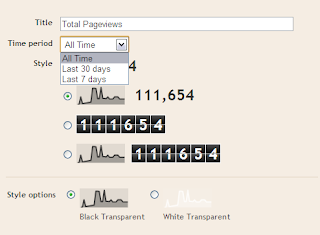
Blogger Stats Gadgets
This new stats gadgets allows you to show of your blog page views with out using any external scripts, just go to your dashboard >> design >> page elements, and click add new gadget, then choose the Blog’s Stats gadget,
this gadget have some great features, you can choose the page views to be displayed as a numbers, or in a bars, and you can choose the both. you can change it’s color, to suit your dark or light colors blogger template.
2. Blog Feeds Control.
Blogger Blog Feeds Control
As a professional or beginner blogger, you must know that your blog feeds are important to your blog readers, and in the past, you didn’t have the full control on your blog feeds, so blogger now added a nice feature allows you to take some control over your blog feeds.
By going to your blogger dashboard, navigate to your settings page, and click on Site Feed tab, Now you will see a drop down menu, this drop down have 3 options,
  • Short : Will show only the first 400 characters of your posts in your feeds, and will ignore the html, and all images on your post
  • Full : Will forward all your post to your feeds and will show all element including html, and all images
  • Now what if you want to show your readers a short part of your post with only one image and not all Images? That’s way blogger team added the next option.
  • Until Jump Break : This will allow your feeds to take only the part that is before the jump break only, and by this way, you can control every single post with it’s own rule.
3. Web Fonts To Templates Designer.
Blogger Web Fonts to templates designer
After google released web fonts free service and millions around the world loved it and used it,
google made a great step by launching web fonts to all blogger users.
You can try it your self by going to the blogger template designers through your account, and then choose the text that you want to change ( post title, blog title, …. ) and click on your favorite font to see it’s preview, if you liked it, then click apply to blog.
4. Official Blogger Android App.
Official Blogger Android App
Android OS used now by millions, if you are a blogger user and have a gadget that running on Android OS, so you should get this amazing app,
it’s the official Blogger Android App. lets see what is this app can do for you,
  • Multiple accounts and blogs : You can easily switch through your blogs and account.
  • Write and save/publish : From your gadget, you can write a post, and add some labels, you may save, or publish it.
  • Photos from camera and gallery : You can add photos directly using your gadget camera, or from your gallery.
  • Sharing to Blogger from gallery or browser.
  • Share location : You can share your location by activating the location bar
  • And some extra amazing features…
5. More Supported Languages.
More Supported Languages
Blogger added new 9 languages to a collection now totaling 40 languages, the new languages are ” Amharic, Arabic, Bengali, Greek, Persian, Gujarati, Kannada, Hindi, Malayalam, Marathi, Nepali, Punjabi, Russian, Sanskrit, Serbian, Tamil, Telugu, Tigrinya, and Urdu “
You can enable your preferred language by going to Settings >> Basics tab, and select Enable, then choose your language.
Please note that : The new language options are only available on the new post editor
Dear readers, this was the most important recent blogger updates, i wish you will benefit from it all.


Friday, June 10, 2011

Orkut Blogger 3 column Template


Orkut Blogger Template is the well designed Orkut Template for Blogspot users . It is a three Column blogger template . Looks Similar to Orkut and it has been designed by modifying the Douglas Bowman’s Blogger Template.


Thursday, June 9, 2011

Free Simplex Enews (Renew Version) Blogger Template

Free Simplex Enews (Renew Version) Blogger Template is a great and profesional design magazine style blogger template for news style blog. It's a next version of Simple Enews blogger template with Disqus comment system.


Binder Blogger Template

Free Binder blogger template is a nice and clean magazine style blogger template adapted from CSS Template to Blogger Template. Features of this template.


Stylish Blogger Template

Free Stylish Blogger Template is a nice and clean blogger template adapted from WordPress Theme to Blogger Template for fashion new blog with nice pattern background


Photo Gallery Dark Blogger Template

Free Photo Gallery Dark Blogger Template is a another clone of Photo Gallery Woody blogger template with dark background. Features of this template like a fade in-out effect using CSS3, auto-thumbnail generation, fast loading, pagination for blogger ready, lightbox effect, etc. It's a 1 column blogger template with pagination for blogger ready and suitable photo or gallery blogs.


Shopping Premium Cart Blogger Template

Free Shopping Cart blogger template is a clean and great template for online store blog. It's a 2 column blogger template with 4 column footer, Simple Cart script for Add to Cart and Paypal Checkout ready. If you looking for online store template for your blog, this template is suitable for you to build your online business.


Mahasoli Tribune Blogger Template

Free Mahasoli Tribune Blogger Template is a clean and nice magazine style blogger template adapted from WordPress Theme to Blogger template with haccordion style menu. It's a 2 column blogger template with right sidebar, 3 column footer, pagination for blogger ready, banner ads ready and more. This template suitable for all type of blogs.


Revine Blogger Template

Free Revine Blogger Template is a nice and clean magazine style blogger template adapted from WordPress Theme to Blogger template. It's a 3 column blogger template with 2 right sidebar, dropdown menu, automatic featured content slideshow, pagination for blogger ready, ads ready and more. This template suitable for all type of blog


Hubs Multicolumn Blogger Template


Free Hubs Blogger Template is a nice and clean blogger template adapted from WordPress Theme to Blogger Template with nice design template
Features of this template :
- 3 column blogger template
- 3 column footer
- magazine syle template
- featured content
- pagination for blogger ready
- Menu dropdown ready
- Tabview ready
- auto readmore, social widgets ready, and more
Its suitable for daily updates blog.


Photogrunge Blogger Template

Free Photogrunge Blogger Template is a nice blogger template for photography related blog with pagination for blogger ready


Black Clean Ads Ready Blogger Template

Free Black Clean Ads Ready Blogger Template is a simple blogger templates with ads ready. It's a 3 column blogger template with left and right sidebar, sexy bookmark ready. This template suitable for monetize blog.


Matus Tribune Blogger Template


Free Matus Tribune Blogger Template is a clean and nice magazine style blogger template adapted from WordPress Theme to Blogger template with haccordion menu. It's a 2 column blogger template with right sidebar, 3 column footer, pagination for blogger ready, banner ads ready and more. This template suitable for all type of blogs.


Wednesday, June 8, 2011

WebsiteKrafters.Com - Complete Web Solution

WebsiteKrafters.Com - Complete Web Solution

• Website Krafters is one of the best Web Developers of Haryana. 
• We are not reseller and have full root access on server. 
• Recently designed more than 750 websites. 
• We always use server grade SuperMicro hardware in our servers. 
• Fully managed web and leave remaining thing to us. 
• Superb responsive support. 
• We are providing guaranteed 99.9% uptime since inception.

WEBSITEKRAFTERS is leading Web Designing company of Haryana. Providing web Designing service to numerous web sites. Our Web Designing plans are designed to include all the features you are looking for at the best possible price.

Baljit Dhaiya, CTO
Web Krafters Pvt. Ltd


Monday, May 30, 2011

Sporty Magazine 3 Premium Blogger Template Free Download

Template Name : Sporty Magazine 3
Template Author : Herdiansyah Hamzah
Url Author http://www.herdiansyah.net
Description : Simple magazine blogger template with adsense ready, easy loading, SEO ready, auto readmore, multi column, fixed page navigation and more.
Designer :Herdiansyah Hamzah

Multiple Use License Only :- 18 $ or 700 Rs. (INR.) + get a free ADSENSE Account + 50 $ Adwords credits

       
  After you see the live demo, please leave your comments. This is important for me to develop a better template in the future. 

or Make a Donation of 10 $ to get it Free.


Thursday, May 26, 2011

Adobe Dreamweaver CS5.5-Website Builder Full Version Download Free/ 10$

Adobe Dreamweaver CS5.5


What is Dreamweaver?

Adobe® Dreamweaver® CS5.5 is the industry-leading web authoring and editing software that provides both visual and code-level capabilities for creating standards-based websites and designs for the desktop, smartphones, tablets, and other devices.

Download a free trial of Dreamweaver CS5.5:

What is the Adobe Download Assistant and how does it work?

The Adobe Download Assistant is an AIR application used with Adobe Creative Suite 5.5 trial product downloads to improve download reliability. When you download a Creative Suite 5.5 trial product, you are prompted to install the Adobe Download Assistant to start the download. (If you have already installed the Adobe Download Assistant, the download starts automatically.) After the trial software is downloaded, Adobe Download Assistant automatically starts the product installation.

Dreamweaver CS5 Read Me Guide


Get the FULL VERSION OF ADOBE DREAM WEAVER FOR ONLY 10$ INSTEAD OF PAYING 150$ TO ADOBE.


Enclosures Provided:
1.Adobe cs5.5 version
2.Adobe Dreamweaver CS5 Keygen
3.Activation Blocker
4.Dreamweaver Install
5.Licensed Key


Top 10 Online Survey Sites That Actually Pay

For some people “Online Survey” is a smart ways to make money online and for some it is a nightmare. Yes it can be a nightmare if you are not careful in choosing survey sites that are legitimate. There are notorious sites that would charge you subscription fee and will disappear. Always remember any fee as up front have chances of being scam sites and they just want to run away with your money. On the other hand, you might come across sites that will ask you fill the survey and shop online to get rewards, remember such sites only require new leads and you would have to extract a lot of them to get to the ones that would really pay you.
But the real question here is, are their legitimate sites? Yes, there are definitely genuine online survey sites that pay you in cash or rewards. The best way to avoid scam is just not to get registered with sites that ask for signup fee. With genuine sites you are sure to make money, but bear in mind you cannot make a living taking up surveys and no site would pay you XXX money for just filling out surveys. But of course, you can make handsome supplementary income of 1$ to 10$ in an hour time. So to make your work easier in locating legitimate site, I have taken a comprehensive list of Top 10 Online Survey that actually pay and is worth your time!10 survey sites Top 10 Online Survey Sites That Actually Pay

Top 10 Online Survey Sites That Actually Pay

Surveysavvy - Surveysavvy is one of the oldest and best survey company to work with. The payment structure is always via check and usually sent within 3 or 4 weeks once the survey is done. They send you survey now and then depending upon your demographic location. You might not see surveys dropping in your inbox daily but once you have it is worth taking up, as the cash out could differ from 1$ to 30$. You are less likely to survive on Surveysavvy if you violate their terms and conditions!
Mysurvey – You will get surveys daily and the payment structure is based on points. Once you have 1000 point in your account you are eligible to fetch in 10$. You might face lot screeners, but you will not go without paid. For taking up a survey you get 10 points, but if you qualify then you might get points anywhere between 200 to 2500! In fact, their surveys are fun to deal with and basically upon shopping. You also have a little application to download for letting you know about each new survey if you wish!
Brandinstitute – This is an interesting site that sends you survey on new and forthcoming products. Mostly these products are about medications and households goods. Once you complete your survey you would get your money in your PayPal account within 6 weeks. Each survey last for about 20 to 30 minutes and pay is around $5 – 20$. You will get lot of surveys each week and you have more chances to qualify!
Opinionoutpost – This is relatively a new market research company, but indeed good. The payment structure is via points – 1 point = 10 cents USD. Their survey could be of any kind and if you want to get more surveys then make sure you fill your profile. The frequency of surveys is about 3 to 4 a week. Do not forget to refer people to this site as each referral is worth 10 points that is $1.00!
Surveyspot – You will get lots and lots of surveys with Surveyspot. You would have to fill out few screeners before getting a paid survey. Many a times you will also get their products via UPS to test and survey is sent after a week. So you can use the product, fill in the surveys and get paid as well. Pay structure is via checks and pay is about $2.00 to $20.00 for each survey. Cash out is possible anytime with this company!
Esearch – Esearch is simple and neat company to work with. You will get about 2 to 5 surveys each week. And the payment structure is via PayPal. Each survey has some form of “incentive” involved. Most incentivize all respondents and some have drawings. In all instances the incentive is clearly spelled out in the survey invitation. These incentives range from $1 to $5.00 or more. Easy to work without any complications!
Harrispollonline – Harris Poll Online powered by Harris Interactive is a very interesting and active survey panel. Payment structure is via points and you make minimum of 30 points with each survey. Their surveys are not only diverse in nature, but will also lead you to another survey immediately if you qualify. The more survey you take the more you have chances to qualify for cash prizes ranging from $10 – $10,000!
TestSpin – You can make up to $15-$20 for a survey with TestSpin if you qualify. Survey invites are always with email notice and incentives are mostly cash. Although you get lots and lots of surveys it might be hard to qualify. Moreover they can also ask to fill up surveys strictly by males/females or a particular age group or ethnicity. Surveys usually take about two to four weeks to complete.
Mindfieldonline – This is another small but straightforward site to deal with. You get surveys about once a week. Payment structure is via PayPal and you must have $10.00 to ask for cash out. Most of the surveys are small and pay you about $2.00 each. It is not hard to quality surveys with mindfieldonline!
Ithinkinc – Their surveys are fun to fill up, although you may not receive often. Payment structure is via check and you get it usually in 3 to 4 weeks after the survey is completed. You would get some screeners before the paid survey is sent. They are mainly about household goods and products!
Taking an online survey is of course an excellent technique to make spare cash. However, certain things like opening an email account and PayPal is a must. The most important thing is to read their terms and conditions before signing up. Do have a note of all the id and password once you start registering with companies. Start taking surveys and see the cash flowing!


PayPal Donation Button Widget - Make Money-How to add Paypal Donation widget to Blogger?


Here is a great way for your readers to reward you for all the hard work and effort you've put into your blog. A PayPal Donation button will allow your readers to easily send you money via PayPal.

PayPal Icons

These icons can be used as your donation button if you choose to customize.


Adding a Paypal Donation Button


Sign into your Paypal account and if you don’t have one you can get a free paypal account here.
  1. Login into your Paypal account with your paypal E-mail address and password:
  2. Click on ‘Merchant Services’ Tab available in the Top Menu
  3. When you scroll down your window, you will see a ‘Donations’ link in the ‘PayPal Website Payments Standard’ heading Section.
  4. Clicking on the ‘Donate’ link will take you a form where you are asked to fill some information’s like Organization name/service, Donation ID (optional).
  5. Click on 'Customize Appearance' in order to use your own image for the button. You may use one of the images above if you like.
  6. After Filing the required information click on ‘Create Button’ link.
  7. Now you will see some HTML Code, copy it

Adding HTML code into Blogger blog:
  1. Sign in into your Blogger Blog and Click on the ‘Layout’ link in your dashboard
  2. Click ‘Add a Gadget’ link and select ‘HTML/JavaScript’ option
  3. Now paste the HTML code that you copied from your Paypal account and save it.
  4. Now open your blog and you will see the ‘Paypal Donate’ button in your blogspot blog sidebar. You can display Donate button wherever you want on your blog like blog Header, footer or its sidebar

Adding HTML code into Wordpress blog:
  1. Login into your Wordpress blog and go to its Dashboard
  2. Click Presentation –> Widgets
  3. Click on the content area in front of ‘Text 1’ widget
  4. Paste your HTML code in the content area available and save changes
  5. Open your Wordpress blog and check donate button will be in your blog sidebar


Blogger Updates

Blogger Tips

Premium Templates

narrowsidebarads

Copyright © 2011. BLOGGING CASTLE- All Rights Reserved | Blog Posts by ANURAG | Edited by ASHISH. Powered by AndroidGyan.Com